> For the complete documentation index, see [llms.txt](https://guide.404.xyz/llms.txt). Markdown versions of documentation pages are available by appending `.md` to page URLs; this page is available as [Markdown](https://guide.404.xyz/404-gen-user-guide/getting-started/readme.md).
# 404—GEN Blender Add-on
v0.14.2 (Released May 2026)
## Overview
The **404—GEN Blender Add-on** is a decentralised AI-powered toolset designed to generate production-ready 3D Meshes and 3D Gaussian Splats (3DGS) natively in Blender. Below is a breakdown of **404—GEN’s** core components:
* **3D Generation:** A text or 2D-to-3D asset generation engine.
* **Splat Editing:** Geometry and Shader Node trees that allow users to view and edit Gaussian Splats natively in Blender.
* **Mesh Conversion for 3DGS:** A specialised texture baking and mesh generation pipeline optimised for 3D Gaussian Splats
{% hint style="info" icon="key" %}
**API & Access:** Features personal API key integration for uninterrupted service, with credit top-ups managed directly via gen.404.xyz.
{% endhint %}
### Software Requirements
Blender 4.5+ ([**Download Here**](https://www.blender.org/download/))
## Installation
#### Step 1: Download the Add-on
Download the latest release ZIP file from [**Gumroad**](https://404gen.gumroad.com/l/blender). Do not unzip the file.
#### Step 2: Install via Blender Preferences
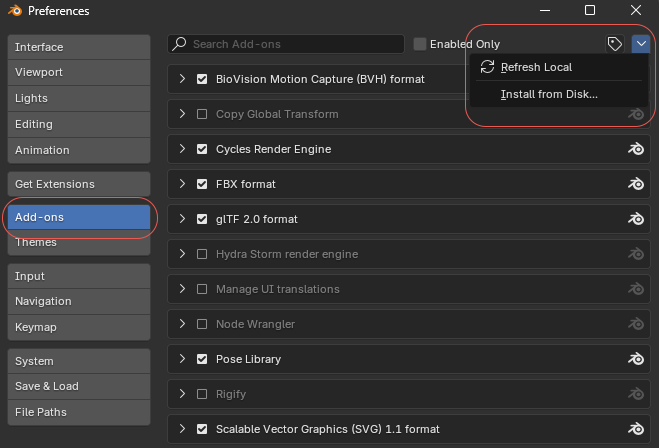
1. Open Blender and navigate to \[**Edit**] **➡️** \[**Preferences**] **➡️** \[**Add-ons**]**.**
2. Click \[**Install from Disk...**] in the top right corner.
3. Select the downloaded addon ZIP file and click \[**Install Add-on**].
Blender Preferences Window
{% hint style="warning" %}
**Important Note for Upgrading Users:** If you have a previous version enabled, you must uninstall it and restart Blender before installing the new version.
{% endhint %}
#### Step 3: Enable and Install Dependencies
1. Check the box next to **404—GEN** to enable it.
2. Expand the add-on dropdown menu.
3. Click \[**Install Dependencies**].
Review the **Privacy Notice** and click \[**Accept**].
Privacy Notice
{% hint style="info" %}
**Windows Users:** If dependency installation fails, close Blender, right-click the Blender icon, and select Run as Administrator, then retry this step.
{% endhint %}
{% hint style="warning" %}
Do not change the default URL.
{% endhint %}
## Usage Guide
### Step 1: Access the Interface
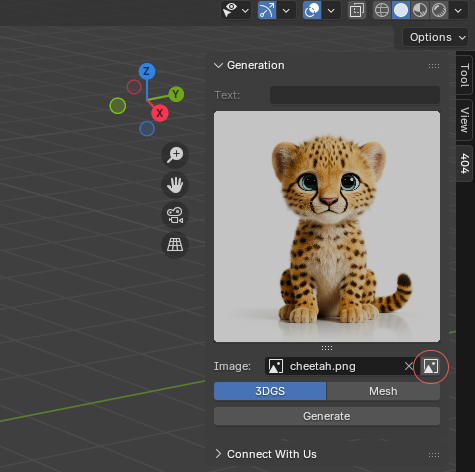
Press **N** on your keyboard (or click the small arrow in the viewport) to expand the sidebar panel and select the **404** Tab.
### 1. Generating from a Text Prompt
1. Type your description into the **Text Prompt Field**.
2. Click \[**Generate**].
{% hint style="info" %}
**Best Practices:** Describe a single object or character. Avoid generating complex multi-object scenes or entire rooms at once. Read more in the [**Prompts Guide**](https://guide.404.xyz/user-guide/prompts).
{% endhint %}
### 2. Generating from a 2D Image Prompt
1. Click the **Open Image** folder icon.
2. Select your 2D source image and click \[**Generate**].
{% hint style="info" %}
**Best Practices:** Use high-resolution images (up to 1024x1024 max) featuring a clean, isolated object on a solid white background.
{% endhint %}
{% hint style="warning" %}
**Please Note:** The Text Prompt Field is completely disabled when a 2D image prompt is active.
{% endhint %}
#### 3. Viewport Shading Setup
To view the generated material properly in Object or Edit mode:
* Press **Z** to open the Shading Menu and select **Material Preview** (or press **2**).
### Personal API Keys
By default, the **404—GEN Blender Add-on** uses a public, shared API key. This means you might encounter rate limits during peak hours, even if you haven't generated much yourself.
#### For Uninterrupted Access:
1. **Sign Up:** Head to [**gen.404.xyz**](https://gen.404.xyz/) and create an account via **Email**, **GitHub**, or **Discord**.
2. **Add Credits:** Top up your account balance to power your generations.
3. **Generate Your Key:** Create a personal API Key in your web dashboard.
4. **Link to Blender:** Paste the key into the API field located under \[**Edit**] ➡️ \[**Preferences**] ➡️ \[**Add-ons**] ➡️ \[**404—GEN**]
{% hint style="warning" %}
**Fair Billing Policy:** You only pay for successful generations. If a generation fails for any reason, the credit cost is automatically refunded to your balance.
{% endhint %}
### Mesh Conversion for 3DGS
Once a Gaussian Splat is generated the **Splat Display Settings** and **Mesh Conversion** dropdown menus will become available.
{% hint style="danger" %}
**Avoid Modifier Application:** Applying the geometry nodes modifier directly will result in a massive, high-poly mesh that degrades drastically if simplified. For optimal visual quality and poly-count control, always use the custom \[**Generate Mesh**] button.
{% endhint %}
Generation Tab with Dropdowns Revealed.
### Splat Display Settings Reference
| **Setting** | **Description** |
| ---------------------- | ---------------------------------------------------------------------------------------------------------------------- |
| **Opacity Threshold** | Filters out fully or partially transparent ellipsoids. Elements below this threshold are hidden. |
| **Display Percentage** | Controls the percentage of total Gaussian Splat points displayed in the viewport. |
| **Min Detail Size** | Controls the density of the generated mesh. Lower values yield higher geometric detail. |
| **Simplify** | Decimates and smooths the final extracted mesh. Higher values produce lighter, smoother meshes. |
| **Angle Limit** | Adjusts the UV unwrapping angle constraint. Lower this value if the final texture exhibits black or missing artifacts. |
| **Texture Size** | Sets the resolution of the baked texture maps in pixels (e.g., 2048). |